The New Microsite: Using Custom URLs + Themes to Replace Landing Pages for Campaigns and Partnerships


For years, the default playbook for a new campaign or partnership has been:
Brief → Figma → dev ticket → one-off landing page → form embedded at the bottom.
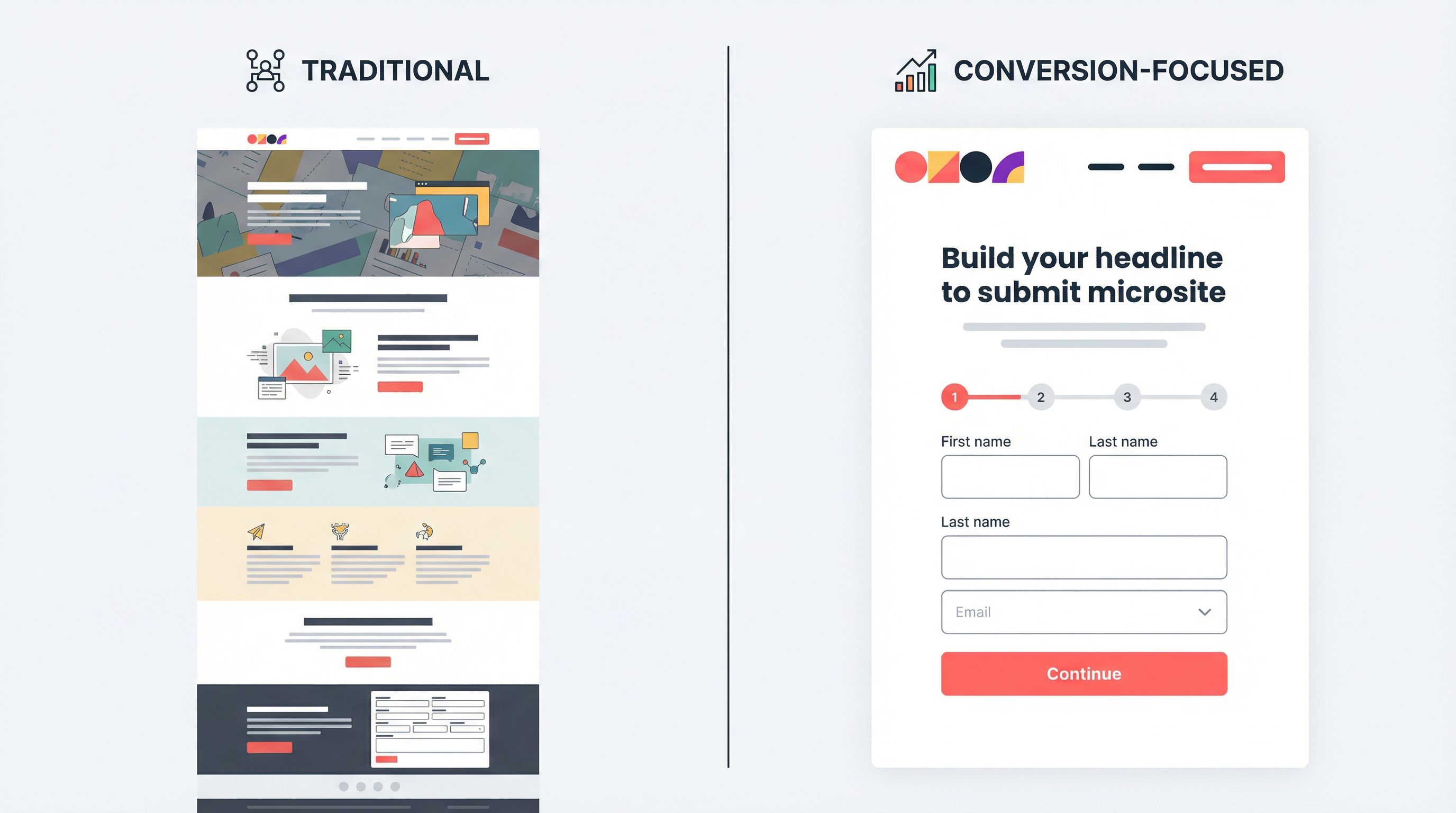
It works—until it doesn’t. Pages take too long to ship, are painful to update, and rarely stay aligned with what’s happening in your actual campaigns. Meanwhile, the only part of that whole stack that truly matters for conversion and operations is the form.
Teams are starting to flip that script.
Instead of “page first, form second,” they’re using tools like Ezpa.ge to make the form itself the microsite: a fully themed, responsive experience with a clean custom URL, embedded storytelling, and real-time syncing into Google Sheets.
This isn’t just a UX flourish. It’s a structural shift in how you:
- Launch campaigns and co-marketing efforts faster
- Give partners and channels dedicated, on-brand destinations
- Keep operations clean (one form, one Sheet, no mystery fields)
- Test offers and positioning without redesigning your whole site
Let’s break down what “the new microsite” actually looks like—and how to start replacing one-off landing pages with custom-URL, theme-driven forms.
Why the New Microsite Model Matters
Traditional landing pages come with hidden costs:
- Slow to ship. Every new campaign or partner wants “their own page,” which usually means design cycles, dev time, QA, and tracking setup.
- Hard to maintain. Changing a headline or adding a field can require another ticket and deploy.
- Operational drift. The form on the page slowly diverges from what RevOps, CX, or Legal actually need.
By contrast, a form-as-microsite approach—using Ezpa.ge with custom URLs and themes—gives you:
-
Speed without sacrificing brand.
- Spin up a new, fully branded microsite in an afternoon.
- Use themes to stay on-brand (or on-partner-brand) without rebuilding layouts.
-
Direct line to your ops backbone.
- Sync every submission into Google Sheets in real time.
- Use that Sheet as your live queue, routing engine, or reporting source.
-
Less duplication, more control.
- One core form can power many microsites via URL-level personalization, instead of cloning 15 versions.
- Governance around themes, URLs, and copy becomes manageable instead of chaotic.
We’ve already explored how teams are using forms as standalone experiences in Forms as Microsites: Replacing One-Off Landing Pages with Theme-Driven Flows. Here, we’ll go deeper on the custom URL + theming layer specifically—and how it can replace traditional landing pages for campaigns and partnerships.
What “Form-as-Microsite” Actually Looks Like
A form-as-microsite isn’t just “a form with a logo.” It combines three ingredients:
- A clean, memorable custom URL
- A theme that matches the campaign or partner context
- A flow that mixes storytelling with structured intake
Think of it as:
- Hero + promise: A strong headline, subcopy, and visual theme that sets context.
- Guided steps: A few short sections that explain and collect at the same time.
- Clear finish line: A confirmation state that tells people exactly what happens next.
Instead of sending someone to yourcompany.com/spring-campaign-2026 where the form is an afterthought, you send them to something like:
forms.yourcompany.com/partner-hub-acmego.yourcompany.com/q2-offerpartners.yourcompany.com/comarketing-brief
Each URL loads a themed Ezpa.ge form that feels like a tiny site, but behaves like a high-converting intake flow.
Why Custom URLs Are the New “Campaign Home”
Custom URLs are doing more work than just “looking nice” in a browser bar. Used well, they become the home base for each campaign or partnership.
1. Memorability and shareability
A URL like go.yourbrand.com/ai-summit is:
- Easy to say on a webinar or podcast
- Simple to paste into partner newsletters or social posts
- Obvious to recognize when it shows up in someone’s inbox or Slack
That matters for:
- Co-marketing: Give each partner their own URL (e.g.,
go.yourbrand.com/ai-summit-acme) and track performance without juggling UTM spaghetti. - Sales and CS: Reps can remember and re-use URLs in calls and emails without hunting for the “latest landing page.”
2. Built-in attribution
Because tools like Ezpa.ge let you define custom URLs per form (or per variant) and sync submissions into Google Sheets, you can:
- Use the URL path itself (
/acme,/beta-users,/q2-promo) as a field in your Sheet. - Filter or pivot by that field to see which campaigns, partners, or channels are actually performing.
For teams that already treat Sheets as their ops brain, this fits neatly with the patterns in Google Sheets as Your Ops Brain: Advanced Form-Driven Workflows Beyond Simple Syncing.
3. URL-level personalization
With URL-level personalization, you don’t need a brand-new form for every campaign. Instead, you:
- Keep one core form structure.
- Use URL parameters or paths to:
- Prefill partner name
- Toggle certain questions on/off
- Adjust copy for specific audiences
For example:
go.yourbrand.com/partner-intake?partner=Acmego.yourbrand.com/partner-intake?segment=enterprise
Behind the scenes, logic in the form can:
- Show additional fields for enterprise prospects
- Swap out microcopy to reference the partner by name
- Route submissions to different queues in your Sheet
We unpack this pattern in depth in URL-Level Personalization: Tailoring One Form to Many Audiences with Naming, Prefills, and Logic.
Themes: Turning One Form Engine into Many Microsites
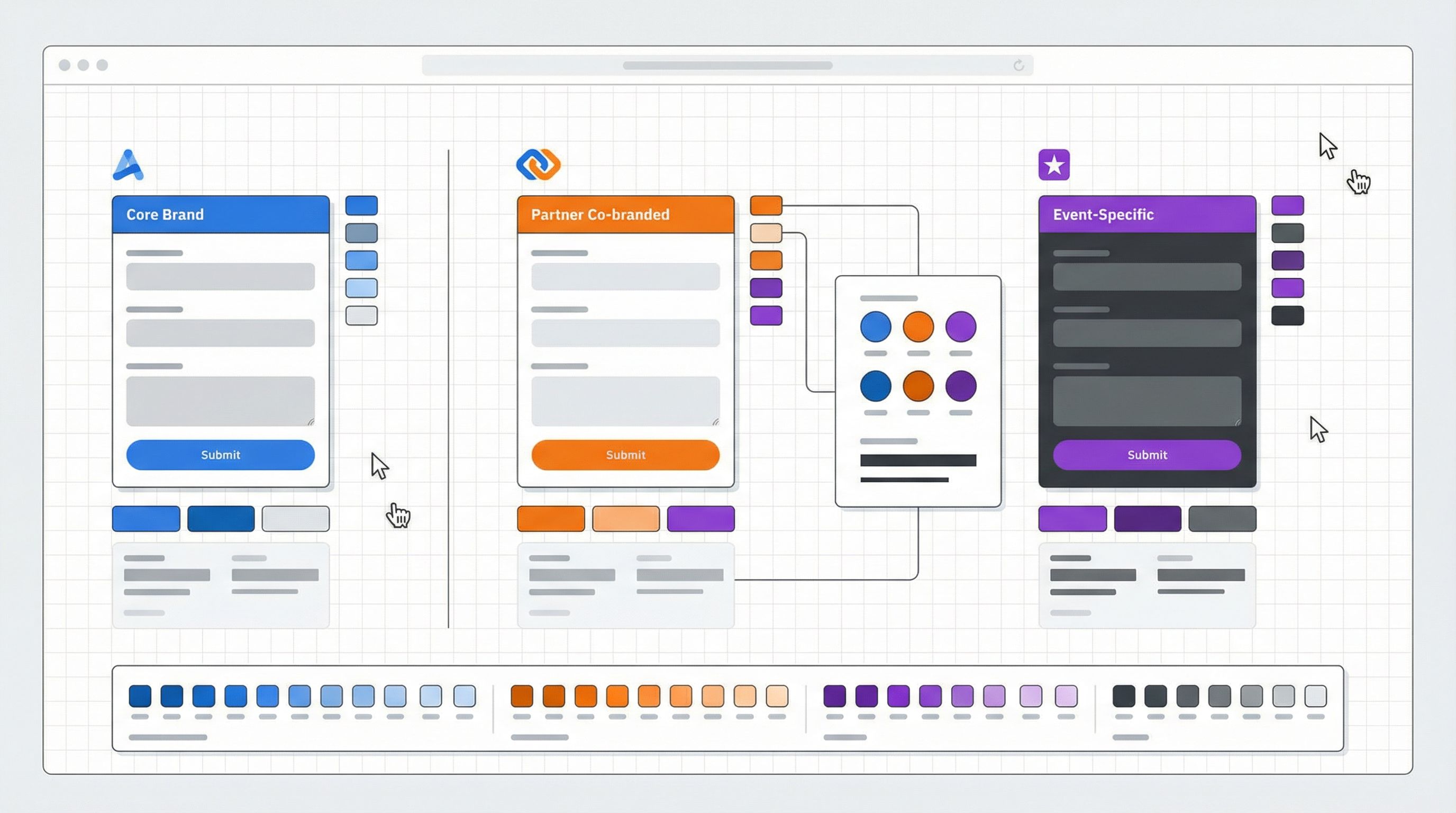
If custom URLs are the “address,” themes are the architecture and interior design of your microsite.
A theme in Ezpa.ge controls things like:
- Color tokens (primary, secondary, accent, background)
- Typography scales and weights
- Button styles and field treatments
- Spacing, radius, and elevation
Why themes matter for campaigns and partnerships
-
On-brand, every time.
- Lock in brand tokens so every new microsite automatically matches your visual system.
- Give operators a safe palette of approved themes rather than letting everyone freestyle.
-
Partner co-branding without chaos.
- Create co-branded themes that pair your logo, colors, and typography with a partner’s.
- Use a specific theme whenever the URL includes that partner (e.g.,
/acme), so their audience feels at home while your brand remains present.
-
Context-aware experiences.
- Use different themes for:
- Compliance-heavy flows vs. playful campaigns
- VIP programs vs. public signups
- Internal ops forms vs. external partner forms
- Use different themes for:
If you’re scaling themes across many teams, the governance patterns in Brand-Consistent Forms at Scale: Governance Rules for Themes, URLs, and Copy are worth borrowing.
Theme tokens vs. one-off styling
The quickest way to make themes unmanageable is to treat them like one-off styles. Instead, use theme tokens:
- Define tokens like
color.brand.primary,radius.card,shadow.elevated. - Map those tokens into a few reusable themes (Core, Partner, Event, Internal).
- Apply themes to forms based on use case and URL.
This way, you can:
- Update a token once (e.g., new brand color) and roll it out across every microsite.
- Keep partner-specific themes aligned with your global system.
Where Microsite Forms Shine: Campaign and Partnership Use Cases
Let’s look at concrete scenarios where a custom-URL, themed form can replace a traditional landing page.
1. Co-marketing campaigns
You and a partner are running:
- A joint webinar
- A co-branded ebook
- A shared offer for a specific segment
Instead of:
- One generic landing page with a logo soup
- Or two separate pages with conflicting messaging
You spin up:
partners.yourbrand.com/acme-ai-webinar- Co-branded theme: your colors + theirs
- Hero copy that speaks to the joint value prop
- Multi-step form that:
- Collects contact info
- Asks which product(s) they use today
- Captures consent for both brands where appropriate
Because everything syncs into Sheets, you can:
- Split leads by partner and region
- Route follow-up tasks to each team’s queue
- Track which partner campaigns actually generate pipeline
For more complex partner ecosystems—onboarding, co-marketing, lead sharing—a form-first approach scales much better than a full portal. The patterns in Forms for Partner Ecosystems: Onboarding, Co-Marketing, and Lead Sharing Without a Portal pair nicely with the microsite model.
2. Performance marketing and paid campaigns
Paid campaigns live and die on:
- Speed to launch
- Ability to iterate
- Clean attribution
Microsite forms help by:
- Letting you create one core offer flow with:
- Clear promise
- Social proof in the early steps
- Smart qualification questions
- Then cloning only the URL and theme per channel:
go.yourbrand.com/offer-searchgo.yourbrand.com/offer-linkedingo.yourbrand.com/offer-retargeting
You can:
- Keep the form fields identical (so ops stays sane).
- Use theme tweaks and copy variants to test positioning.
- Use URL or hidden fields to attribute performance by channel.
3. Partner and affiliate hubs
For affiliate programs and long-tail partners, building a full portal is often overkill. Instead, create:
partners.yourbrand.com/<partner-name>microsites that:- Explain their specific offer or commission structure
- Provide a short FAQ
- Include a form for:
- Lead submissions
- Co-marketing ideas
- Support or escalation requests
Each partner gets a link they can bookmark and share. You get structured intake and clean reporting—all without a new portal or CMS.
4. Internal intake for campaign ops
Not every microsite needs to be public.
Your marketing or partnerships team can use Ezpa.ge forms with internal themes and URLs like:
ops.yourbrand.com/campaign-briefops.yourbrand.com/partner-request
These become:
- The only way to request a new campaign or partner activation
- The source of truth for approvals, timelines, and assets
If you’re an agency, this pattern pairs well with a form-first operating model, like the one we describe in Form-First Playbooks for Agencies: From Discovery to Retainer Renewals in Google Sheets.
How to Design Your First Microsite Form (Step-by-Step)
You don’t need to overhaul everything at once. Start with a single campaign or partnership and follow this sequence.
Step 1: Choose a high-leverage use case
Look for a flow that is:
- Already form-based (demo request, event signup, partner intake)
- Painful to update in your current CMS
- Important enough that you care about conversion and data quality
Good candidates:
- Upcoming webinar with a key partner
- Quarterly promo campaign
- New partner application or co-marketing request
Step 2: Define the core story and outcome
Before you touch fields, answer:
- Who is this for? (segment, role, partner audience)
- What’s the promise? (clear benefit in one sentence)
- What do we need them to do? (register, request access, submit a brief)
- What do we need to know to follow up effectively? (qualification, routing, consent)
This will shape:
- Your hero headline and subcopy
- The number and structure of steps
- Which fields are must-have vs. nice-to-have
Step 3: Sketch the flow as sections, not pages
Think in sections inside the form, instead of separate pages on a site:
-
Intro & promise
- Headline, short paragraph, maybe a supporting visual or stat
- Simple call to action: “Tell us a bit about yourself to save your spot.”
-
About you
- Name, email, company, role
- Segmenting questions (industry, size, region)
-
Context & intent
- What brought you here?
- Which partner/product are you most interested in?
- How soon are you looking to act?
-
Confirmation & next steps
- Clear message on what happens next and when
- Optional link to resources or a calendar
Step 4: Apply or create the right theme
In Ezpa.ge:
- Start from your core brand theme.
- Adjust only what’s necessary for this microsite:
- Accent color (e.g., partner’s secondary color)
- Hero background (image, gradient, or pattern)
- Button style emphasis
Guardrails:
- Keep typography and spacing consistent with your system.
- Avoid inventing new colors or components for every campaign.
If you’re experimenting with new positioning, you can use “theme-first branding” to try new looks here before rolling them out to your main site.
Step 5: Assign a memorable custom URL
Pick a URL that:
- Reflects the campaign or partner name
- Is short enough to say out loud
- Matches how your team talks about the thing internally
Examples:
go.yourbrand.com/ai-lunch-and-learnpartners.yourbrand.com/acme-briefgo.yourbrand.com/q2-upgrade
If you’ll have multiple variants, decide on a pattern early:
go.yourbrand.com/ai-lunch-and-learn-acmego.yourbrand.com/ai-lunch-and-learn-contoso
Step 6: Wire it into your ops backbone
Use Ezpa.ge’s real-time Google Sheets syncing to:
- Send all submissions from this microsite into a dedicated tab or Sheet.
- Add columns for:
source_urlpartner_namecampaign_name
- Build basic views:
- A live queue of new submissions
- Filters for partner, region, or segment
- Simple status fields (New, In Progress, Closed)
Over time, you can evolve this into:
- Automated routing (e.g., using filters, Apps Script, or no-code tools)
- Dashboards for partner performance
- Audit trails for who changed what in the form
Step 7: Launch, observe, and iterate
Once live:
- Watch completion rates, drop-off points, and field-level engagement.
- Ask:
- Are people confused by any questions?
- Are we getting the right level of detail?
- Are partners or channels using the URL as expected?
The advantage of a microsite form is that iteration is cheap:
- You can adjust copy, fields, or logic without redeploying a full page.
- Themes and URLs stay stable, so you’re not constantly updating links.
Bringing It All Together
The new microsite isn’t a separate CMS or a new class of web property. It’s a pattern:
- Custom URLs as the home base for each campaign or partnership
- Themes as the bridge between brand consistency and contextual relevance
- Forms as the place where story and structure meet—explaining just enough while collecting exactly what you need
When you lean into this pattern with a tool like Ezpa.ge, you get:
- Faster launches, because you’re not waiting on full-page builds
- Cleaner ops, because every campaign still feeds the same structured data backbone
- Better partner and campaign experiences, because each audience gets a dedicated, on-brand destination
Most importantly, you stop treating forms as an afterthought and start treating them as the core surface where campaigns, partnerships, and operations actually connect.
Next Step: Ship Your First Microsite This Week
You don’t need a redesign or a new CMS to start.
Pick one upcoming campaign or partner initiative and:
- Draft a simple, story-driven form in Ezpa.ge.
- Apply a theme that reflects the campaign or co-branding.
- Give it a clean, memorable custom URL.
- Wire it into a Google Sheet so every submission becomes structured, actionable data.
From there, let results—not habit—decide whether you really need another traditional landing page.
If you’re ready to make forms your new microsites, Ezpa.ge is built for exactly this: custom URLs, theme-driven experiences, and real-time Sheets syncing that keeps your campaigns and partnerships tightly connected to your operations.
Start with one microsite. Watch how quickly your team asks, “Why weren’t we doing it this way all along?”