URL-Level Personalization: Tailoring One Form to Many Audiences with Naming, Prefills, and Logic


Most teams hit the same wall with forms:
- Marketing wants separate links for every campaign.
- Sales wants different questions for high-intent demo requests vs. casual trials.
- Ops wants everything in one clean Google Sheet.
The usual response is to clone forms endlessly—slightly different questions, slightly different branding, slightly different Sheets. It works for a while… until no one remembers which link is current, which Sheet is accurate, or where that VIP lead actually came from.
URL-level personalization is the way out.
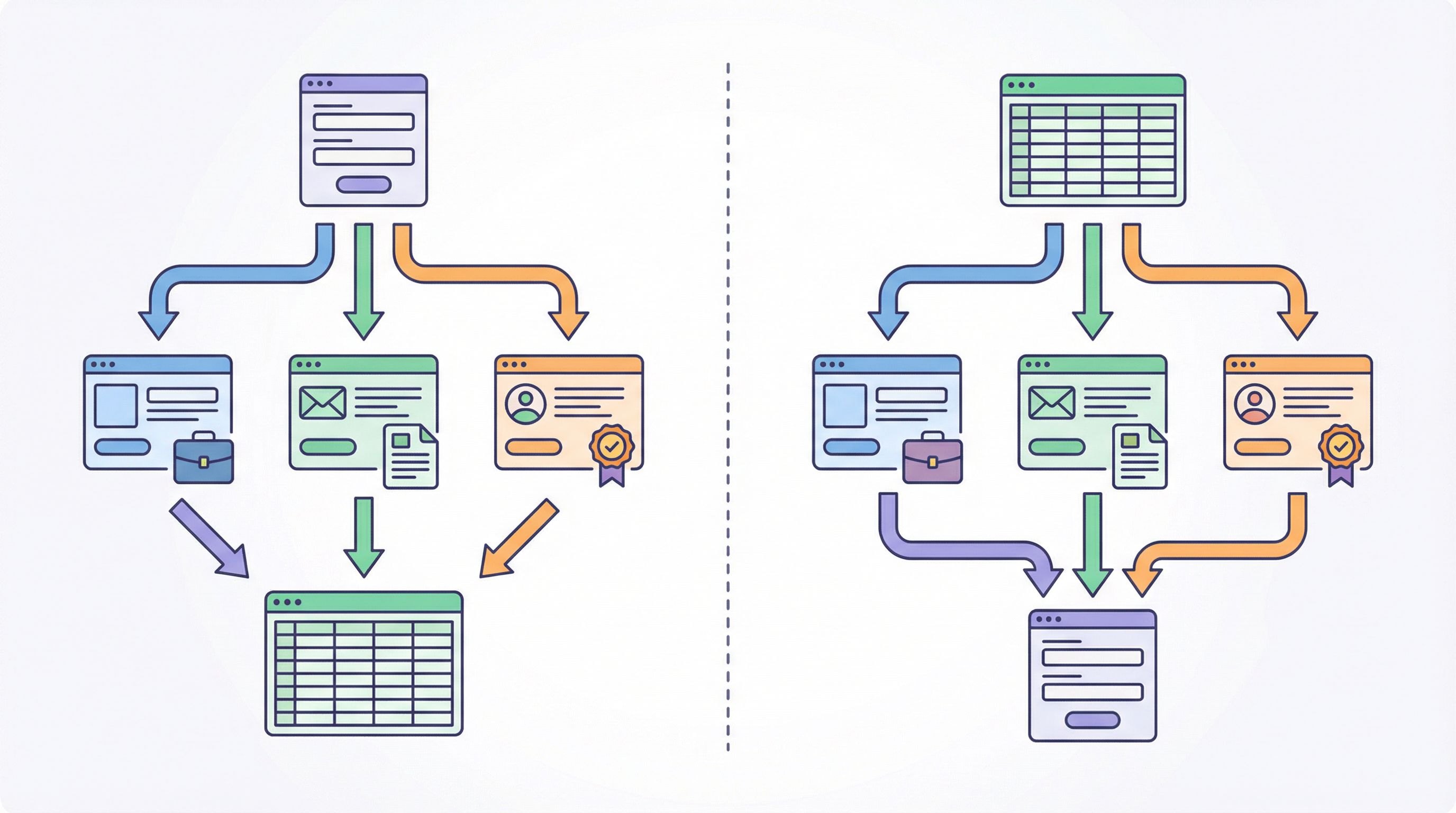
Instead of spinning up 15 near-duplicate forms, you keep one core form and let the URL itself do the work: naming, prefilled values, and logic that adapts to who clicked and where they came from.
With Ezpa.ge, this isn’t an edge-case trick; it’s how you scale forms without drowning in maintenance.
Why URL-Level Personalization Matters
Personalization at the URL level is about context:
- Who is this person? (segment, customer vs. prospect, partner vs. direct)
- Where did they come from? (ad, email, social, in-product prompt, QR code)
- What did you promise them? (offer, value prop, feature, content)
- How ready are they? (curious, evaluating, or “talk to sales now”)
When you ignore that context and send everyone to the same generic form, you pay a few quiet taxes:
- Lower completion rates – People see questions that don’t match what they just clicked.
- Messy downstream ops – Teams have to guess intent from free-text fields or UTM tags.
- Form sprawl – You clone forms to handle edge cases instead of using one flexible system.
URL-level personalization flips that pattern:
- You keep one canonical form for a workflow.
- You create many URLs pointing to it, each carrying just enough information to tailor the experience.
- You use prefills and logic to adapt questions, copy, and routing per URL—without breaking your data model.
If you’re already thinking in terms of form systems and structured URLs, this is a natural extension of what we covered in Form Systems, Not One-Off Links.
The Building Blocks: Naming, Prefills, and Logic
You can think of URL-level personalization as three layers that stack:
- Naming – How you name the URL so humans can reason about it.
- Prefills – Values you pass into the form via query parameters.
- Logic – Rules inside the form that respond to those values.
Let’s break each one down.
1. Naming: Human-Readable URLs as Form Metadata
The first layer is deceptively simple: use your URLs as labels.
Instead of:
https://forms.ezpa.ge/xyz123
Aim for something like:
https://forms.ezpa.ge/demo/paid-search-enterprisehttps://forms.ezpa.ge/partner/tech-integrationhttps://forms.ezpa.ge/support/vip
Why it matters:
- Fewer mistakes in the wild – It’s much harder to paste the wrong link into a campaign brief when the URL clearly says
/demo/paid-search-enterprise. - Easier analytics and governance – When you look at logs or Sheets, URL paths become a de facto taxonomy: channel, segment, intent.
- Better collaboration – Sales, marketing, and ops can talk about “the /support/vip form link” instead of “that old Google Form we used last quarter.”
If you’ve already started designing a scalable URL taxonomy, URL-level personalization is the next step beyond what you’re doing with Custom URLs as Routing Logic.
Practical tips for naming:
- Use consistent segments in paths, e.g.
/demo/{channel}-{segment}. - Bake in intent where possible:
/signup/self-serve,/signup/sales-assisted. - Keep a simple internal index in a Sheet: URL, owner, purpose, destination Sheet.

2. Prefills: Let the URL Do the Typing
Next layer: prefilled fields via query parameters.
Most modern form tools (including Ezpa.ge) let you pre-populate fields by appending query parameters to the URL, like:
?email=jane@company.com?plan=enterprise?source=retargeting_ad
This sounds minor, but it’s the backbone of URL-level personalization.
What You Can Pre-Fill
Think about three categories of prefill:
-
Identity & context
- Email, name, account ID
- Company, role, existing plan
- Region, language
-
Campaign & channel
- Source:
?source=linkedin_sponsored - Offer:
?offer=webinar-followup - Creative:
?creative=pricing-video
- Source:
-
Form behavior flags
?segment=enterprise?priority=vip?flow=shortor?flow=full
Some of these values can come from your CRM or product (for logged-in users), others from marketing tooling (UTMs, email merge tags).
Benefits of Prefills
- Less friction for the user – Known fields are either filled or hidden.
- Cleaner data – No typos in company names or emails when they’re passed from a trusted source.
- Richer segmentation – You can store both what the user typed and what the URL told you about them.
Research on form conversion consistently shows that reducing perceived effort—especially on repetitive or known fields—improves completion rates and user satisfaction. Auto-filling or hiding fields the user doesn’t need to touch is one of the most reliable ways to reduce that effort.
Implementation Patterns
A few reliable patterns:
- Email follow-ups – From your email platform, link to a feedback or upgrade form with
?email={{subscriber.email}}&plan={{custom.plan}}. - In-product prompts – Link from your app to an upsell or support form with
?account_id=12345&plan=pro&feature=usage-alerts. - Partner flows – Give each partner a unique link like
?partner_id=acme&partner_tier=gold.
On Ezpa.ge, you can map these query parameters directly to hidden fields that sync into Google Sheets. That way, the user never sees them, but your ops team always does.
3. Logic: Let the Form Respond to the URL
Naming and prefills are powerful, but the real unlock is when you combine them with conditional logic inside the form.
In Ezpa.ge, that usually looks like:
- Show/hide fields based on a hidden segment field.
- Change copy or help text based on plan or channel.
- Route submissions differently based on flags like
priority=vip.
You can think of it as “one form, many experiences”.
Example: One Demo Form, Multiple Audiences
Imagine you have a single “Request a demo” form.
You might share different URLs like:
/demo/paid-search-enterprise?segment=enterprise&flow=short/demo/newsletter?segment=midmarket&flow=full/demo/in-product?segment=customer&flow=expansion
Inside the form, you can wire up logic such as:
- If
segment = enterprise→- Show fields for team size, security requirements, timeline.
- Auto-tag submission as
route_to=AE_team.
- If
segment = customerandflow = expansion→- Hide basic “How did you hear about us?” questions.
- Show questions about current usage, org structure, budget owner.
- If
flow = short→- Show only the 3–5 highest-signal fields, ideal for high-intent paid traffic.
The result: one canonical demo form, but a very different experience for each audience.
This same pattern works beautifully with the high-intent flows we explored in Form UX for Fast Decisions. URL flags let you switch between “fast lane” and “full context” without creating separate forms.
Designing Your URL Personalization Strategy
URL-level personalization works best when you design it top-down, not ad hoc. Here’s a practical way to approach it.
Step 1: Start from the Workflow, Not the Tool
Pick one workflow that matters:
- Sales demo requests
- Partner intake
- Support escalations
- Feature feedback
Ask:
- Who are the main audiences for this workflow?
- Through which channels do they usually arrive?
- What decisions do we need to make after submission? (routing, priority, next step)
This gives you a rough matrix: Audience × Channel × Intent.
Step 2: Define URL Segments and Flags
From that matrix, design a simple URL schema plus a set of query parameters.
Example for demo requests:
- Path:
/demo/{channel}-{segment}channel:paid,email,website,productsegment:enterprise,midmarket,smb,customer
- Query parameters:
?flow=short|full?priority=vip|standard?owner=sdr|ae|cs
You don’t need to use every flag from day one. The goal is to standardize what you might use so future URLs fit the same pattern.
Step 3: Map Flags to Form Behavior
Now, list out how each flag will change the form:
- Fields
- Which questions are only for enterprise?
- Which questions can we skip for existing customers?
- Copy
- How should intros and CTAs change for cold vs. warm audiences?
- Routing
- Who should be notified or assigned based on
ownerorpriority?
- Who should be notified or assigned based on
In Ezpa.ge, this typically means:
- Adding hidden fields for
segment,priority,flow,owner. - Creating conditional visibility rules for sections.
- Setting up different notification or integration rules based on those fields.
This is where URL-level personalization overlaps with using forms as lightweight workflows. If that’s a direction your team is heading, you’ll find deeper patterns in Forms as Lightweight Workflows.
Step 4: Standardize How You Generate Links
The biggest failure mode with URL personalization is inconsistency:
- Someone manually types
?segement=enterprise(typo). - Another person uses
?priority=highinstead ofvip. - A third person forgets
?flow=shorton a paid campaign.
Solve this by:
-
Keeping a simple “Link Builder” Sheet or internal tool where teammates choose:
- Workflow (demo, support, partner)
- Channel
- Segment
- Priority
…and it outputs a correctly structured URL.
-
Documenting the allowed values for each parameter.
-
Reviewing URLs during campaign or playbook reviews.
Step 5: Close the Loop with Analytics
Once your URLs are live, you want to know: Is personalization actually helping?
Track:
- Completion rate per URL (or per segment of URLs).
- Time-to-complete for short vs. full flows.
- Downstream metrics: lead quality, ticket resolution time, expansion rate.
Because all submissions are feeding into the same Google Sheet, you can slice performance by segment, flow, channel, and priority without juggling multiple forms.
If you’re trying to keep analytics focused and actionable, the ideas in Low-Noise Analytics (another Form & Function piece) pair nicely with URL-level personalization—measure only what helps you refine your flags and logic.
Real-World Patterns You Can Steal
Here are a few concrete patterns teams use with Ezpa.ge and URL-level personalization.
1. Paid Search vs. Brand Traffic
- Paid search link:
/demo/paid-enterprise?segment=enterprise&flow=short&source=google_ads- Minimal fields, strong social proof, quick handoff to sales.
- Website “Talk to Sales” link:
/demo/website-enterprise?segment=enterprise&flow=full&source=website- More context fields, since visitors are warmer and have more patience.
Same form. Different URLs. Different experience.
2. VIP Support Escalations
- Standard support form link:
/support/general?priority=standard&flow=full - Internal-only VIP link for CSMs:
/support/vip?priority=vip&flow=short&owner=cs
Logic:
- If
priority = vip→ show a special “Urgency” field, auto-assign to senior team, trigger Slack alert. - If
priority = standard→ route to normal queue with longer SLA.
3. Partner-Specific Intake
Give each partner a unique URL:
/partner/intake?partner_id=acme&partner_tier=gold/partner/intake?partner_id=beta&partner_tier=silver
Logic:
- Show different co-marketing options or discount structures based on
partner_tier. - Sync
partner_idinto Sheets so downstream reporting and payouts are trivial.
4. Research and Feedback Loops
When you’re running ongoing product research:
- In-product prompt:
/feedback/feature-x?segment=customer&feature=x - Post-webinar follow-up:
/feedback/webinar?segment=prospect&topic=pricing
The form can:
- Ask different questions for customers vs. prospects.
- Tag submissions by feature or topic for roadmap decisions.
If you’re exploring how to turn every submission into a roadmap signal, URL-level flags pair well with the approach in Forms as Feature Feedback Loops.
Guardrails: Personalization Without the Creep Factor
URL-level personalization is powerful, but there’s a line between helpful and unsettling.
A few guardrails:
- Be transparent about what you know. If you prefill email or company, make it editable and clearly visible.
- Avoid exposing sensitive IDs. Use internal IDs in hidden fields, not in visible copy.
- Don’t over-segment copy. Micro-targeted language that feels too specific (“We saw you clicked our ad about your budget constraints…”) can backfire.
- Respect consent and privacy. If you’re passing data from product or CRM into forms, make sure it aligns with your privacy policy and user expectations.
For a broader exploration of where the ethical line sits with tailored forms, our piece on Ethical Personalization is a good companion read.
Bringing It All Together
URL-level personalization lets you:
- Run one form per workflow instead of a dozen near-duplicates.
- Tailor experiences per audience, channel, and intent using naming, prefills, and logic.
- Keep data clean and centralized in a single Google Sheet.
- Scale experiments—new URLs, new flags—without redesigning the form each time.
Done well, your URLs become:
- A taxonomy for how people reach you.
- A control panel for which experience they see.
- A data spine that keeps ops and analytics sane.
Where to Start (This Week)
If you want to put this into practice without a big project, here’s a simple 5-day plan:
Day 1 – Pick one workflow.
Choose demo requests, partner intake, or support escalations—whichever has the most pain right now.
Day 2 – Define 2–3 segments and 2–3 channels.
Name them clearly: enterprise, customer, paid, website, product.
Day 3 – Add hidden fields and basic logic.
In your Ezpa.ge form, add hidden fields for segment, flow, priority, and wire up a few simple show/hide rules.
Day 4 – Generate 3–5 personalized URLs.
Create links for your main combinations (e.g., paid enterprise, website midmarket, in-product customers) using consistent parameters.
Day 5 – Ship and observe.
Swap old links for the new ones in one or two places. Watch completion, time-to-complete, and downstream quality over the next couple of weeks.
You don’t need to rebuild your entire form universe. You just need one workflow where URL-level personalization proves itself.
Summary
- URL-level personalization is about using naming, prefills, and logic to let one form serve many audiences.
- Human-readable URLs make your form system understandable and maintainable across teams.
- Prefilled fields reduce friction and enrich your data model without extra effort from users.
- Conditional logic driven by URL flags lets you adapt fields, copy, and routing per audience, channel, and intent.
- A thoughtful URL schema + link generation process keeps everything consistent and prevents sprawl.
- With a single canonical form per workflow, you get better UX, better data, and less operational chaos.
Take the First Step with Ezpa.ge
If your team is juggling too many form links—and still not getting the clarity you need—URL-level personalization is one of the highest-leverage changes you can make.
Start small:
- Pick one form that matters.
- Turn it into your canonical workflow form.
- Spin up a few personalized URLs using naming, prefills, and simple logic.
Ezpa.ge is built for exactly this style of form system: custom URLs, real-time Google Sheets syncing, and flexible logic that lets you tailor experiences without multiplying forms.
Ship one personalized form this week. Once you see how much cleaner the data and experience feel, it’s hard to go back to generic links and endless clones.