URL-Driven Ops: How Custom Links Turn One Form into a Dozen Targeted Workflows


Most teams don’t have a “form problem.” They have a link problem.
You probably already have a solid intake form for:
- New leads
- Partner requests
- Support tickets
- Internal ops asks
But then reality hits:
- Marketing wants a version just for paid search.
- Sales wants a shorter path for warm referrals.
- Partners need a co-branded flow.
- Ops needs extra fields for one enterprise customer.
So you fork the form. Again. And again.
Within a quarter, you’re staring at 14 “final” versions, all slightly different, all wired to the same spreadsheet in slightly different ways. Reporting breaks. Brand drifts. No one is sure which link to send.
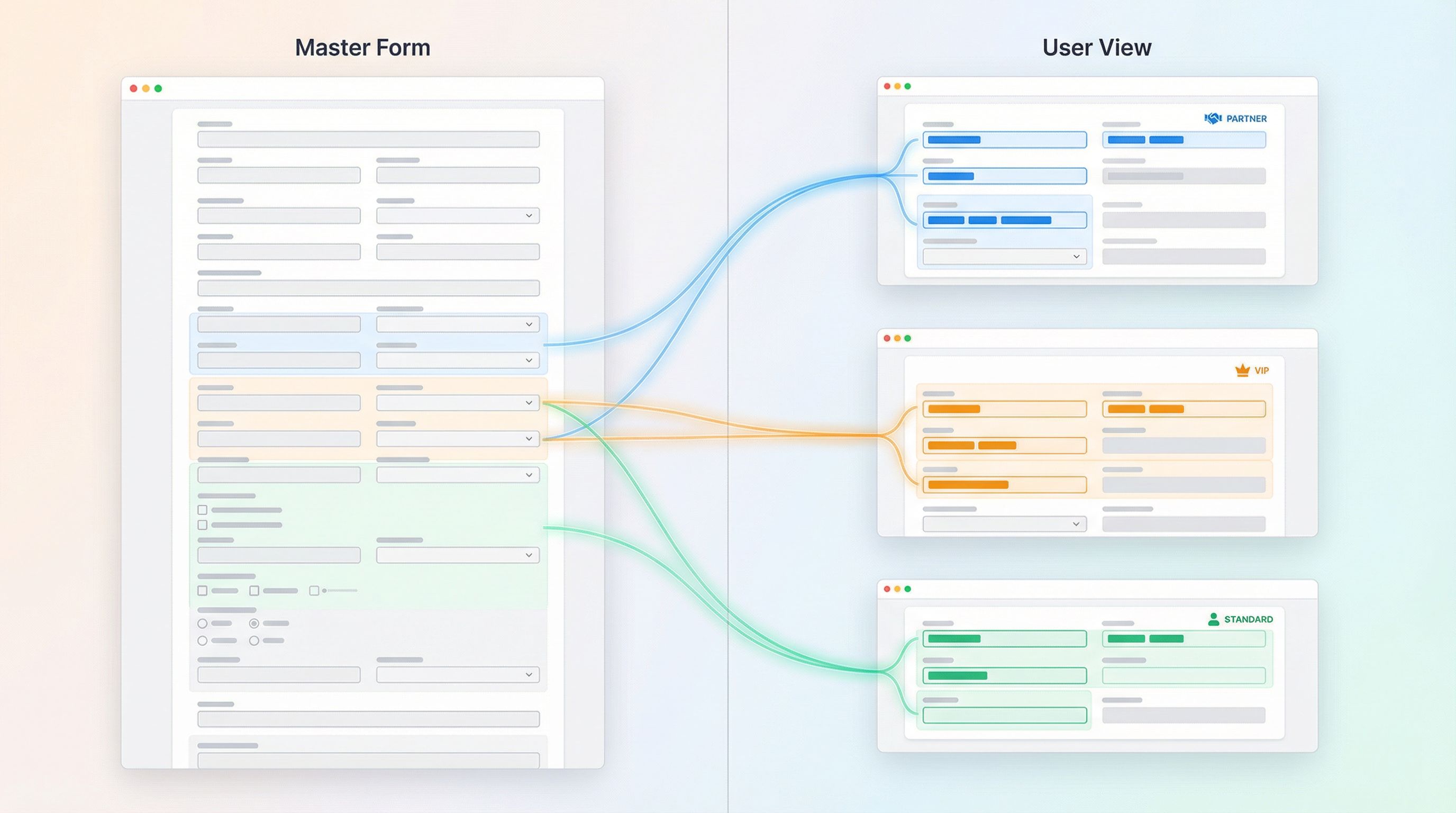
URL-driven ops is the alternative: instead of cloning forms endlessly, you use custom URLs and URL parameters to turn one underlying form into dozens of targeted workflows—without losing structure, reporting, or brand control.
This post is about how to do that with tools like Ezpa.ge, where you can:
- Create a single, well-designed core form
- Give different audiences their own clean, memorable URLs
- Use URL parameters to prefill fields, set hidden values, and trigger logic
- Sync everything into one live Google Sheet for routing and reporting
The result: ops gets consistency, teams get flexibility, and users get experiences that feel built just for them.
Why URL-Driven Ops Matters
Custom URLs aren’t just a branding flourish. They’re an operating model.
1. One source of truth, many experiences
When every new need becomes a new form, you get:
- Fragmented data (slightly different fields, labels, and options)
- Broken reporting (no single place to answer simple questions)
- Version drift (some forms updated, others forgotten)
With URL-driven ops, you flip that:
- One canonical schema → one set of fields, one logic map
- Multiple URLs → tailored entry points for channels, partners, or segments
- Shared backbone → everything lands in the same Sheet with clear metadata
If you’ve explored running campaigns or partnerships on top of forms-as-microsites, URL-driven ops is the structural counterpart to that UX idea. It’s how you keep the underlying system sane while you experiment at the edges. For a deeper dive into using custom URLs and themes as your “microsite layer,” see The New Microsite: Using Custom URLs + Themes to Replace Landing Pages for Campaigns and Partnerships.
2. Precision routing without new tools
Most teams outgrow generic inboxes before they outgrow their form builder.
Custom URLs let you:
- Route submissions differently based on which link someone used
- Auto-assign owners, queues, or SLAs in your Google Sheet
- Trigger different follow-ups or automations
All of that can be driven by a couple of hidden fields prefilled via URL parameters—no new app, no new queueing system.
3. Targeted UX without endless cloning
Different audiences often need slightly different experiences:
- Fewer questions for VIPs or internal stakeholders
- Extra guidance for new partners or first-time buyers
- More detailed context for enterprise or compliance-heavy flows
With URL-driven ops, you can:
- Show/hide sections based on URL parameters
- Prefill known fields (company, email, plan tier)
- Change copy or helper text conditionally
That’s the same philosophy behind AI-personalized forms—tailoring the flow to the person, not just the generic use case. If you’re thinking about going further with dynamic questions and smart defaults, you’ll like AI-Personalized Forms at Scale: Dynamic Questions, Smart Defaults, and Guardrails.
The Core Pattern: One Form, Many Links
Let’s ground this in a concrete pattern you can replicate.
Imagine you run a demo request form for your product. You want:
- A standard public link for your website
- A shorter version for sales reps to send to warm intros
- A partner-specific link that tags the referral source
- A VIP link that routes straight to your senior AE queue
Instead of four different forms, you create one Ezpa.ge form:
- URL:
https://ezpa.ge/demo - Fields: name, email, company, role, use case, urgency, etc.
- Hidden fields:
source,segment,priority,partner_id
Then you create custom URLs that all point to the same form, but with different parameters:
- Website:
https://ezpa.ge/demo?source=website - Sales warm intro:
https://ezpa.ge/demo?source=sales_intro&segment=warm - Partner X:
https://ezpa.ge/demo?source=partner&partner_id=X - VIP lane:
https://ezpa.ge/demo?source=vip&priority=high
On submit, everything lands in one Google Sheet, with source/segment/priority already set. Filters and views in Sheets turn that into:
- A VIP queue
- A partner-only pipeline
- A website-only conversion report
All without duplicating the form.

Step 1: Design the Canonical Form First
URL-driven ops only works if the underlying form is solid.
Before you touch URLs or parameters, invest in a canonical form that can support all your scenarios.
Define the shared schema
Ask:
- What data do we need every time, regardless of channel?
- What data is only needed sometimes, for specific paths or audiences?
- What should be required vs. optional?
Design your fields so that:
- Core identifiers (name, email, company, account ID) are always present.
- Optional or advanced fields are grouped into sections you can show/hide with logic.
- Free-text fields are used intentionally—structured fields wherever possible.
If you’re planning to use AI downstream—for summarization, routing, or risk scoring—this is also where you make your forms AI-ready: clear labels, single-purpose fields, and predictable options.
Separate “ops metadata” from user-facing fields
Anything that describes how or where the submission came from should be captured in hidden fields, not left as guesswork later.
Common examples:
source(website, outbound, event, partner)campaign(spring_launch_2026, q2_webinar)segment(prospect, customer, partner, internal)priority(normal, high, VIP)owner_hint(team or region)
In Ezpa.ge, you can add these as hidden fields and set them via URL parameters, so the user never sees them—but your Sheet does.
Step 2: Map Your URL Strategy
Once you have a canonical form, you can design a URL strategy that mirrors your actual operations.
Start with your “entry points”
List the places people currently encounter your forms:
- Website CTAs
- Email campaigns
- Paid ads
- Partner portals or co-marketing pages
- In-product prompts
- Internal docs or Slack channels
For each entry point, answer:
- What do we know about the person already? (channel, segment, partner, plan)
- What do we want to happen operationally? (queue, owner, SLA, follow-up type)
- Do they need a slightly different experience? (prefilled fields, fewer questions, extra guidance)
That gives you a matrix of entry point → metadata + UX needs.
Define your URL “vocabulary”
Pick a consistent set of URL parameters you’ll use across forms. For example:
utm_source,utm_medium,utm_campaignfor marketing attributionsegmentfor audience typepartner_idfor referralspriorityfor routingplanortierfor customers
Consistent naming is critical. It’s how you avoid having vip=true in one place and priority=high in another.
Turn patterns into URL templates
For each pattern, define a reusable template:
-
Standard marketing link:
https://ezpa.ge/demo?utm_source={{source}}&utm_campaign={{campaign}} -
Partner referral link:
https://ezpa.ge/demo?source=partner&partner_id={{partner_code}} -
Internal VIP link:
https://ezpa.ge/demo?segment=customer&priority=high&source=internal
Document these in your ops wiki or playbook so that anyone creating a new link can follow the same rules.
Step 3: Use URL Parameters to Prefill and Personalize
Once your URL vocabulary is in place, you can start using it to prefill fields and shape the experience.
Prefill known information
If you already know something, don’t make people type it again.
Examples:
-
From an email campaign:
https://ezpa.ge/demo?email={{subscriber.email}}&utm_campaign=q2_launch -
From your app:
https://ezpa.ge/support?account_id={{account.id}}&plan={{account.plan}} -
From a partner portal:
https://ezpa.ge/partner-request?partner_id=acme_inc&segment=partner
In Ezpa.ge, you can map URL parameters to specific fields so that when the form loads, those values are already filled in (and optionally locked).
Trigger conditional logic
URL parameters don’t have to just fill fields; they can also control logic.
Some patterns:
- If
segment=partner, show the partner-specific questions. - If
priority=high, display a note about faster response times. - If
plan=enterprise, reveal an advanced configuration section.
This is where URL-driven ops starts to overlap with dynamic, AI-personalized flows: the form responds to context, not just inputs. You can go deeper on this pattern in AI-Personalized Forms at Scale: Dynamic Questions, Smart Defaults, and Guardrails.
Step 4: Wire URLs into Your Ops Backbone (Google Sheets)
Custom URLs only become “ops” once they’re connected to your backbone—usually a Sheet.
With Ezpa.ge’s real-time Google Sheets sync, every submission becomes a new row. URL parameters and hidden fields land as columns you can filter, sort, and compute on.
Create views that mirror your URLs
For each major URL pattern, create a corresponding view in Sheets:
- Partner pipeline: filter where
source = partner - VIP queue: filter where
priority = high - Website-only leads: filter where
utm_source = website - Internal requests: filter where
segment = internal
Then layer on:
- Conditional formatting (e.g., red for overdue, green for SLA met)
- Pivot tables for channel performance
- Simple formulas for assignment (e.g., round-robin by region)
If you want a deeper blueprint on turning form submissions into live queues and dashboards, Forms as Source-of-Truth Dashboards: Turning Google Sheets Views into Live Ops Cockpits is a helpful companion.
Use Sheets as your decision engine
Once the data is structured, you can:
- Trigger email sequences based on
segmentorcampaign - Push high-priority rows into Slack channels
- Sync partner-attributed leads into your CRM with the right tags
The key: the URL is the first decision, the Sheet is the second. Together they give you routing power that usually requires dedicated workflow tools.
Step 5: Govern Your URLs Like You Govern Your Forms
URL-driven ops can get messy if you don’t put a few guardrails in place.
Establish naming and usage rules
Decide upfront:
- Which parameters are allowed (and which are not)
- Which values are standardized (e.g.,
prioritycan only below,normal,high) - Who is allowed to create new URL variants
Document examples of good and bad URLs:
- Good:
https://ezpa.ge/demo?source=partner&partner_id=acme_inc&priority=high - Bad:
https://ezpa.ge/demo?src=prtnr&partner=Acme&urgency=super_hot
Track and audit changes
Treat URLs as part of your ops surface:
- Keep a simple log (in a Sheet or doc) of official URLs, their purpose, and owners.
- Periodically review which URLs are still in use.
- If you change form logic or fields, check which URLs might be affected.
This mindset is similar to what we talk about in ops-ready form logs—knowing who changed what, when, and why. You’re just extending that thinking to the URL layer.
Avoid “shadow URLs”
Shadow URLs are ad-hoc links individuals create without telling ops:
- A rep adds
&priority=highto every link they send. - A marketer invents
&segment=event_leadwithout aligning on schema.
You don’t need to block creativity—but you do need a path from experiment → standard. That’s exactly the spirit of Ops-Ready Form Experiments: Shipping New Intakes, URLs, and Logic in a Single Afternoon: test quickly, then formalize what works.
Real-World URL-Driven Patterns You Can Steal
To make this concrete, here are patterns teams are already using with Ezpa.ge.
1. VIP support lanes
Problem: High-value customers get stuck in the same support queue as everyone else.
Pattern:
- One support form, multiple URLs:
- General:
https://ezpa.ge/support?source=help_center - VIP:
https://ezpa.ge/support?segment=vip&priority=high&source=cs_team
- General:
- Hidden fields capture
segmentandpriority. - Google Sheet view filters
segment = vipinto a dedicated tab. - SLA tracking formula flags any VIP ticket older than X hours.
2. Partner-attributed leads without a portal
Problem: You want to credit partners for leads without rolling out a full partner portal.
Pattern:
- One lead form:
https://ezpa.ge/partner-lead - Each partner gets a unique URL, e.g.:
https://ezpa.ge/partner-lead?source=partner&partner_id=acme_inc - Partner ID is stored in a hidden field.
- Sheet columns calculate partner performance and payout.
If you’re running broader partner operations on forms instead of portals, this dovetails nicely with the ideas in Forms for Partner Ecosystems: Onboarding, Co-Marketing, and Lead Sharing Without a Portal.
3. Internal request routing
Problem: Internal requests (design, ops, legal) are scattered across Slack and email.
Pattern:
- One internal request form with a
request_typefield. - Different teams get different URLs that prefill
request_typeandsegment=internal:- Design:
https://ezpa.ge/internal-request?request_type=design&segment=internal - Legal:
https://ezpa.ge/internal-request?request_type=legal&segment=internal
- Design:
- Sheet filters by
request_typeto create team-specific queues.
4. Campaign-specific onboarding
Problem: You’re running multiple campaigns that all drive to the same onboarding flow, but you want to tailor the questions slightly.
Pattern:
- Single onboarding form with sections for different use cases.
- Campaign URLs:
- Webinar:
https://ezpa.ge/onboard?utm_campaign=webinar_q2&use_case=education - Product launch:
https://ezpa.ge/onboard?utm_campaign=launch_pro&use_case=pro_features
- Webinar:
- Logic: if
use_case=education, show the education-specific questions and content.
Putting It All Together
URL-driven ops is less about clever parameters and more about a mindset:
One form, many doors. One backbone, many workflows.
If you:
- Design a strong canonical form with a clear schema and hidden ops fields
- Define a URL vocabulary that encodes source, segment, priority, and partner data
- Use parameters to prefill and personalize instead of cloning forms
- Wire everything into Google Sheets as your live ops brain
- Govern URLs like any other ops asset, with naming rules and change tracking
…you can turn a single Ezpa.ge form into a dozen (or more) targeted workflows—without sacrificing clarity, brand, or data integrity.
Summary
- The problem: Teams clone forms for every new channel, partner, or use case, creating chaos and breaking reporting.
- The shift: Use custom URLs and URL parameters to turn one canonical form into many targeted entry points.
- The mechanics:
- Hidden fields store ops metadata (source, segment, priority, partner_id).
- URL parameters prefill those fields and trigger conditional logic.
- Ezpa.ge syncs submissions into a single Google Sheet.
- The payoff:
- Cleaner data and reporting
- Faster routing and better SLAs
- Tailored experiences for different audiences
- Fewer forms to maintain, more workflows supported
Your Next Move
You don’t need to redesign your entire system to start. Pick one form and three URLs.
- Choose a form that already has multiple versions (demo request, support, partner lead).
- Consolidate the fields into a single canonical Ezpa.ge form.
- Add hidden fields for
source,segment, andpriority. - Create three custom URLs that represent real entry points (e.g., website, partner, VIP).
- Wire the form to Google Sheets and build simple views that mirror those URLs.
Ship it. Watch how much easier it becomes to answer, “Where did this come from?” and “Who should handle this?”
From there, you can expand: more URLs, richer logic, tighter Sheets automations, and eventually a fully URL-driven ops layer across your forms.
If you’re ready to see how far you can go with a form-first, URL-powered approach, open Ezpa.ge, spin up a new form, and give your first custom URL a job to do. One good link can replace a dozen half-maintained forms—and give your ops engine a lot more leverage.