Forms as On-Ramps to AI: Capturing the Right Signals to Power Recommendations, Scoring, and Routing


AI doesn’t start in your CRM, your data warehouse, or your model provider. It starts at the very first question you ask.
Every form you ship—lead intake, support request, onboarding survey, partner application—is an on-ramp to AI. It’s the moment where you decide what signal your models (and your humans) will get to work with.
If those signals are vague, inconsistent, or missing, your “AI strategy” will always feel underwhelming. If they’re intentional and structured, you unlock:
- Sharper lead and account scoring
- Smarter recommendations and next-best-actions
- Faster, more accurate routing to the right team or workflow
- Better training data for future models
This post is about treating forms as that on-ramp—designing them so your AI and automation layers have exactly what they need to make good decisions.
Why Forms Are the Front Door for AI
Most teams talk about AI like it’s something that happens after the form submit.
- “We’ll use AI to summarize responses.”
- “We’ll route tickets with an AI classifier.”
- “We’ll have AI write follow-up emails.”
All useful. But the highest leverage is one step earlier: what you ask, how you ask it, and how the answers land in your systems.
Think of each form submission as a mini dataset:
- A set of features (fields) you can feed into models
- A set of labels you can attach later (won / lost, churned / renewed, high / low satisfaction)
- A context snapshot of who this person is and what they’re trying to do
When forms are designed with AI in mind, you get:
- Cleaner inputs – Less guesswork for models, fewer brittle rules.
- Richer context – Enough nuance to personalize without asking 50 questions.
- Consistent structure – The same concepts captured the same way across channels.
If you’ve read AI-Ready Forms: Structuring Your Questions Today for Smarter Models Tomorrow, this is the next layer: not just structure, but which signals you collect to power recommendations, scoring, and routing.
The Three Big AI Use Cases Forms Can Feed
Before you redesign anything, get clear on what you’re trying to power. Most form-driven AI use cases cluster into three buckets.
1. Recommendations
Use forms to decide what to show, offer, or suggest next:
- Product or plan recommendations
- Content or education paths
- Feature enablement and onboarding steps
- Upsell / cross-sell suggestions
Here, you’re looking for signals about fit and intent:
- Who is this person? (role, seniority, industry, company size)
- What are they trying to accomplish right now?
- What constraints do they have? (budget, timeline, technical stack)
2. Scoring
Use forms to decide how valuable or urgent something is:
- Lead scoring (MQL / PQL models)
- Customer health scoring
- Risk or fraud scoring
- Candidate or application scoring
You’re looking for signals that correlate with future outcomes:
- Expansion potential
- Likelihood to churn or downgrade
- Risk profile or compliance complexity
- Strategic fit or long-term value
3. Routing
Use forms to decide who should handle this and what should happen first:
- Sales territory or segment routing
- Support queue triage (priority, skill-based routing)
- Internal ops queues (finance, legal, IT, facilities)
- Partner or vendor workflows
You’re looking for signals about urgency, complexity, and ownership:
- SLA expectations
- Technical vs. non-technical issues
- Region, language, or regulatory constraints
- Existing relationship (VIP vs. net-new)
Most high-impact setups combine all three:
One form → Signals → AI model(s) → Recommendation + Score + Route
Start With the Decision, Not the Field
The biggest mistake teams make is starting with, “What should we ask?” instead of, “What decisions do we want to make?”
Flip the order:
- List the decisions you want AI or automation to make.
- Identify the signals that would make those decisions easy.
- Design questions that reliably capture those signals.
Step 1: Enumerate the decisions
Pick one form and write down the top 3–5 decisions that should happen after submit. For example, a demo request form:
- Should this go to enterprise or commercial sales?
- Is this a high-intent, ready-to-buy lead or early research?
- Should we prioritize this over other requests?
- Which rep or team should own it?
Step 2: Define the ideal signals
For each decision, ask: If we knew X, the decision would be trivial.
Continuing the demo example:
- Enterprise vs. commercial → company size, contract value, region
- Intent → project timeline, problem severity, existing tooling
- Priority → ARR potential, urgency, strategic industry
- Ownership → territory, language, product line
Now you have a signal wishlist.
Step 3: Turn signals into questions
Translate each signal into the smallest, clearest question you can ask:
- Company size → “How many employees work at your company?” (with ranges)
- Timeline → “When are you looking to implement a solution?”
- Problem severity → “How is this problem affecting your team right now?” (with a short scale + optional free text)
- Product line → “Which area are you most interested in?” (multi-select)
You can see how this mirrors the thinking in AI-Aware Question Design: Writing Prompts That Train Better Internal Models From Day One, but here you’re explicitly mapping questions to downstream AI decisions.

Designing Fields That Models Can Actually Use
Once you know what to ask, the next step is how to ask it so models don’t have to guess.
1. Prefer structured fields over free text (with one big exception)
AI is good at interpreting language, but structure still wins for most operational decisions.
Use:
- Dropdowns / radio groups for categorical choices (industry, role, plan type)
- Multi-select for use cases or features of interest
- Sliders or scales for intensity (urgency, budget comfort, complexity)
- Checkboxes for yes/no constraints (requires SSO, needs SOC 2, etc.)
Reserve free text for:
- Narrative context you’ll use to train summarization or classification models later
- Edge cases that don’t fit your current taxonomy
A powerful pattern:
Structured field + optional short text
- “Which best describes your primary goal?” (multi-select)
- “Anything else we should know?” (short text)
This gives models a clean backbone with room for nuance.
2. Normalize your vocab across forms
If your sales form calls it “Company size,” your CS form calls it “Team size,” and your partner form calls it “Headcount,” your models will see three different columns for the same idea.
Pick a canonical set of concepts and reuse them everywhere:
company_size_bucketprimary_use_caseregionsegmentrisk_profile
Tools like Ezpa.ge make this easier because you can reuse and evolve the same core form across brands and campaigns, while still customizing the surface. If you’re running multi-brand or partner programs, the pattern from One Form, Many Brands: Running White-Label Programs with Themes and Custom URLs is a great way to keep one data schema while giving each partner their own experience.
3. Capture ground truth labels where possible
Your models need outcomes, not just inputs.
Whenever you can, design forms and downstream workflows so you can attach labels later:
- Deal outcome: won / lost / stalled
- Support outcome: resolved / escalated / bug / feature request
- Customer outcome: renewed / downgraded / churned
You don’t have to ask the customer for these; you just need a consistent way to write them back into the same row or record your form created.
If you’re syncing Ezpa.ge forms into Google Sheets, this can be as simple as:
- A “Status” column your team updates
- A “Segment” column your AI or rules engine writes to
- A “Score” column that holds your current or experimental scoring logic
Over time, that sheet becomes a training dataset you can feed into more advanced models.
Mapping Signals to Recommendations
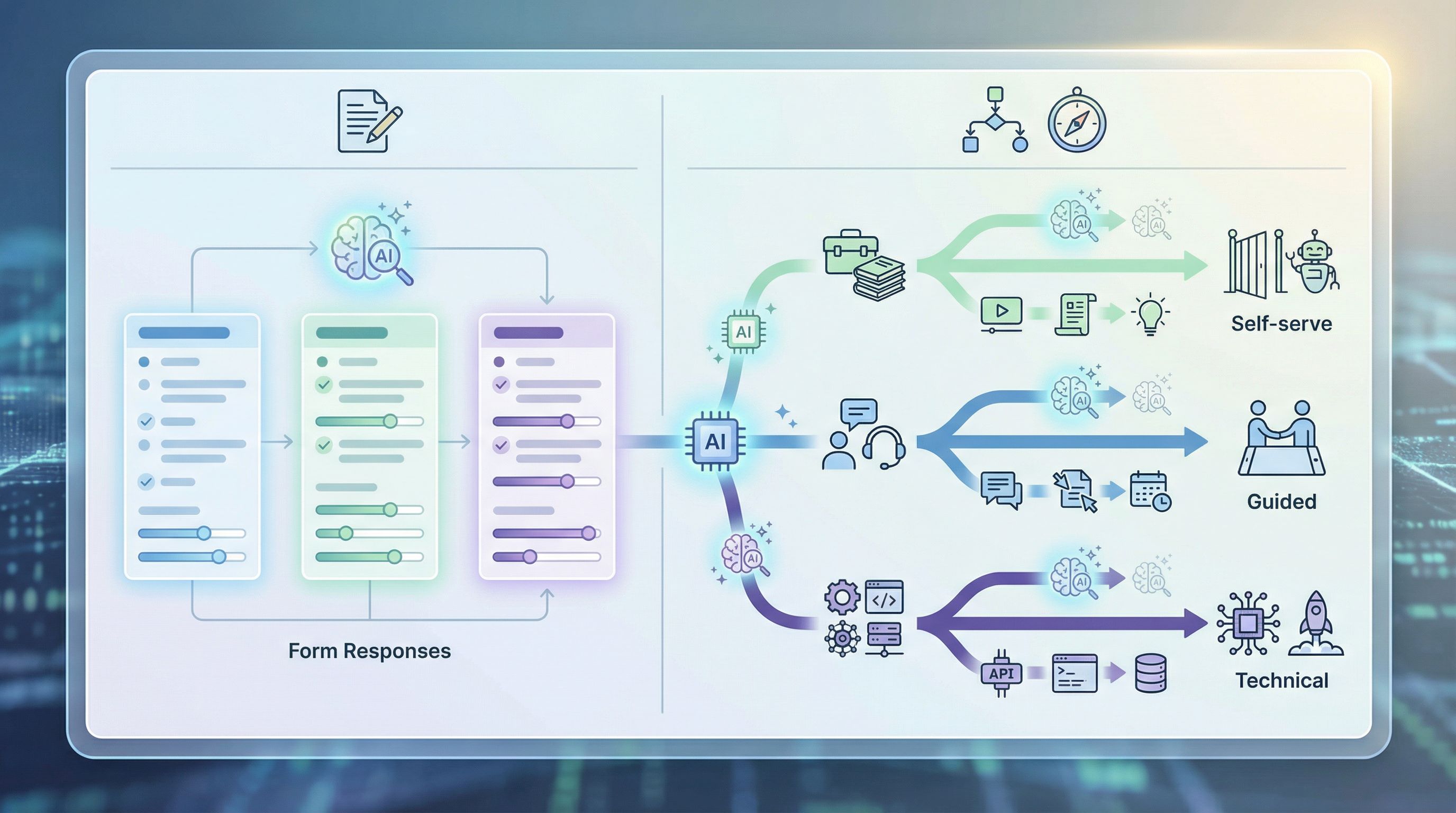
Let’s make this concrete with a simple recommendation system you can build off form responses.
Example: Onboarding path recommendations
You run a SaaS product with three primary onboarding paths:
- Self-serve quick start
- Guided setup with a specialist
- Technical implementation with a solutions engineer
Your signup form could collect:
- Role (IC, manager, exec, technical lead)
- Team size using the product
- Main goal in the next 30 days
- Integration requirements (none, basic, complex)
- Preferred level of guidance (DIY, some help, full support)
From there, you can:
- Define simple rules first (if integration = complex → path 3)
- Layer AI suggestions on top (model predicts likelihood of successful self-serve vs. needing human help)
- Personalize content in your welcome email and in-app experience based on the chosen path
The same pattern works for:
- Suggesting pricing tiers or bundles
- Recommending educational content or academy tracks
- Proposing next steps for support (self-serve article vs. live chat vs. ticket)
The key is that the signals live in the form, not as an afterthought in a separate survey.
Turning Form Data into Scoring Models
Scoring is where the “on-ramp” metaphor really shines. A small number of well-chosen fields can dramatically improve how you prioritize.
1. Start with a simple, explainable score
Before you jump to complex models, define a transparent formula based on your form fields.
Example: Lead score from a demo form
- +20 points if company size ≥ 200 employees
- +15 points if role is Director+ or technical decision-maker
- +10 points if timeline is “this quarter” or sooner
- +10 points if primary goal matches your ICP use case
- +5 points if current tool is a direct competitor
You can calculate this directly in Google Sheets when responses land from Ezpa.ge:
=20*(company_size_bucket>="200+")
+15*(role IN {"Director","VP","C-level","Head of"})
+10*(timeline IN {"ASAP","This quarter"})
+10*(primary_use_case IN ICP_use_cases)
+5*(current_tool IN competitors)
(Translated into your actual sheet formulas, of course.)
This gives you a baseline score to compare any AI-driven approach against.
2. Layer AI on top of your baseline
Once you’ve collected enough data (scores + outcomes), you can train or configure models to:
- Suggest weight tweaks (e.g., timeline is more predictive than you thought)
- Surface non-obvious patterns (e.g., certain industries with small teams are high-value)
- Predict outcomes directly (e.g., probability of closing within 60 days)
Because your form fields are already structured and consistent, you don’t need a massive data engineering project to get started.
3. Close the loop with outcomes
The most important (and most neglected) step: write outcomes back to the same dataset.
- Add a “Result” column and make it mandatory for owners to fill (won / lost / no decision)
- Add a “Reason” field with a controlled vocabulary (bad timing, no budget, missing feature)
- Periodically export or connect this sheet to your modeling environment
Now your forms aren’t just intake—they’re the start of a continuous learning system.
For more on how to turn form responses into repeatable, evolving processes, see From Form to Playbook: Turning Google Sheets Responses into Repeatable Ops SOPs.
Routing Work in Real Time
Routing is where people feel the impact of good signals: faster responses, fewer handoffs, and less “who owns this?” confusion.
1. Ask explicitly about urgency and impact
Instead of guessing from long text answers, add fields that capture:
- Urgency: “How urgent is this request?” (Low / Medium / High / Critical)
- Impact: “Who is affected?” (Just me / My team / My department / Whole company)
- Blocking status: “Is this blocking work right now?” (Yes/No)
These three fields alone can power:
- Priority queues in support
- Escalation rules for ops
- SLA commitments for VIPs
2. Collect routing keys up front
Make sure your form includes everything you need to route without manual lookup:
- Account or customer ID
- Region / time zone
- Product area or category
- Language preference
Use these as inputs to your routing logic:
- Simple rules in Sheets or your CRM
- AI models that classify tickets into categories or teams
- Combined systems (model suggests, rules enforce guardrails)
If you’re already using patterns from From Form to Live Queue: Building Real-Time Triage for Support, Sales, and Ops with Google Sheets, adding AI on top becomes a natural extension: the queue stays the same; the way items enter and get prioritized becomes smarter.
3. Design for exceptions
No routing system is perfect. Build in:
- A clear “reassign owner” action that updates the source of truth
- A way to flag misrouted items and learn from them
- A short internal form for team members to request new routing rules or fields
Every misrouted ticket is a hint that you’re missing a signal or question.
Making Forms AI-Ready Without Hurting Conversion
All of this only works if people actually complete your forms.
A few patterns to keep the experience smooth while still collecting rich signals:
1. Progressive disclosure
Show only what’s necessary at each step:
- Start with the bare minimum (name, email, high-level goal)
- Reveal more detailed questions based on earlier answers
- Use multi-step flows to keep each screen lightweight
If you’re deciding between a single-page vs. multi-step experience, the patterns in Multi-Step vs. Single-Page Forms: How to Choose the Right Flow for Each Use Case can help you pick the right structure for your AI-driven forms.
2. Explain why you’re asking
People are more willing to answer meaningful questions when they understand the benefit.
- “We ask about your timeline so we can match you with the right team and set expectations.”
- “Knowing your tech stack helps us skip irrelevant questions and get you to value faster.”
This is especially important for fields that feel sensitive (budget, revenue, headcount).
3. Make it accessible and trustworthy
Accessible forms aren’t just the right thing to build—they also produce cleaner, less noisy data.
- Clear labels and help text
- Logical tab order and keyboard navigation
- High-contrast themes and readable typography
The patterns in Inclusive by Default: Accessible Form Patterns That Don’t Sacrifice Conversion are directly aligned with AI-readiness: fewer errors, more consistent answers, and higher completion rates.
Putting It All Together with Ezpa.ge
Tools like Ezpa.ge give you the building blocks to make this practical:
- Customizable themes and URLs so you can tailor the experience to different audiences without breaking your data model.
- Real-time Google Sheets syncing so every response instantly becomes part of your operational and modeling backbone.
- Responsive, modern form UX so you can ask smarter questions without scaring people away.
A simple implementation plan:
- Pick one high-impact form (demo request, support intake, partner application).
- List the decisions you want AI or automation to make after submit.
- Map those decisions to signals, then to specific fields.
- Refactor the form in Ezpa.ge: add structured fields, clarify labels, and trim anything that doesn’t serve a decision.
- Wire responses into Google Sheets, and add basic scoring and routing formulas.
- Pilot AI assist: use models to summarize long answers, suggest priorities, or recommend next steps.
- Iterate monthly based on where models or humans still struggle—those gaps usually mean you’re missing a signal.
You don’t need a full AI platform rollout to start. You just need one form, one sheet, and a clear sense of the decisions you care about.
Summary
Forms are more than boxes on a page—they’re the on-ramps your AI and automation systems depend on.
When you:
- Start with the decisions you want to make
- Design fields as reusable, structured signals
- Map those signals to recommendations, scores, and routes
- Keep everything synced into a live, queryable surface like Google Sheets
…you turn every submission into fuel for smarter, faster, more human workflows.
The payoff isn’t just better models. It’s:
- Prospects getting to the right person on the first try
- Customers seeing relevant guidance instead of generic docs
- Internal teams spending less time triaging and more time solving
And as your AI capabilities grow, you’re not scrambling to retrofit messy data. You’ve been training your systems all along—one well-designed form at a time.
Take the First Step
You don’t have to redesign every flow.
Choose one form that matters this quarter—maybe your demo request, your main support intake, or your partner application.
Then:
- Write down the 3–5 decisions you wish were automated after submit.
- Audit the form: are you collecting the signals those decisions actually need?
- Use Ezpa.ge to update the questions, add structure, and sync responses into a Google Sheet.
- Add a simple scoring or routing rule based on those new signals.
Ship that, watch how it changes your day-to-day, and iterate.
Once you feel the difference from one AI-ready form, it becomes obvious: every form is an on-ramp. You get to decide whether it leads to guesswork—or to a system that learns and improves with every response.