URL-First Campaigns: Using Custom Links to A/B Test Channels, Audiences, and Offers Without New Landing Pages


URL-First Campaigns: Using Custom Links to A/B Test Channels, Audiences, and Offers Without New Landing Pages
Marketing teams are under constant pressure to launch more experiments: new channels, fresh offers, different audiences. But there’s a bottleneck that never seems to go away:
“We’d love to test that… but we need a landing page first.”
Design has to mock it up. Engineering has to wire it. Analytics has to tag it. Legal might even want a look. By the time the page is live, the moment has passed—or the team has moved on.
URL-first campaigns flip that script.
Instead of starting with a page, you start with a link.
If you have a flexible form system with custom URLs—like Ezpa.ge, plus real-time syncing into Google Sheets—you can:
- Launch channel and offer tests in hours, not weeks
- Attribute performance down to the exact link someone clicked
- Reuse the same form experience while still learning which paths drive the best outcomes
This isn’t theory. It’s a practical way to run more experiments with less design and engineering overhead.
What “URL-First” Actually Means
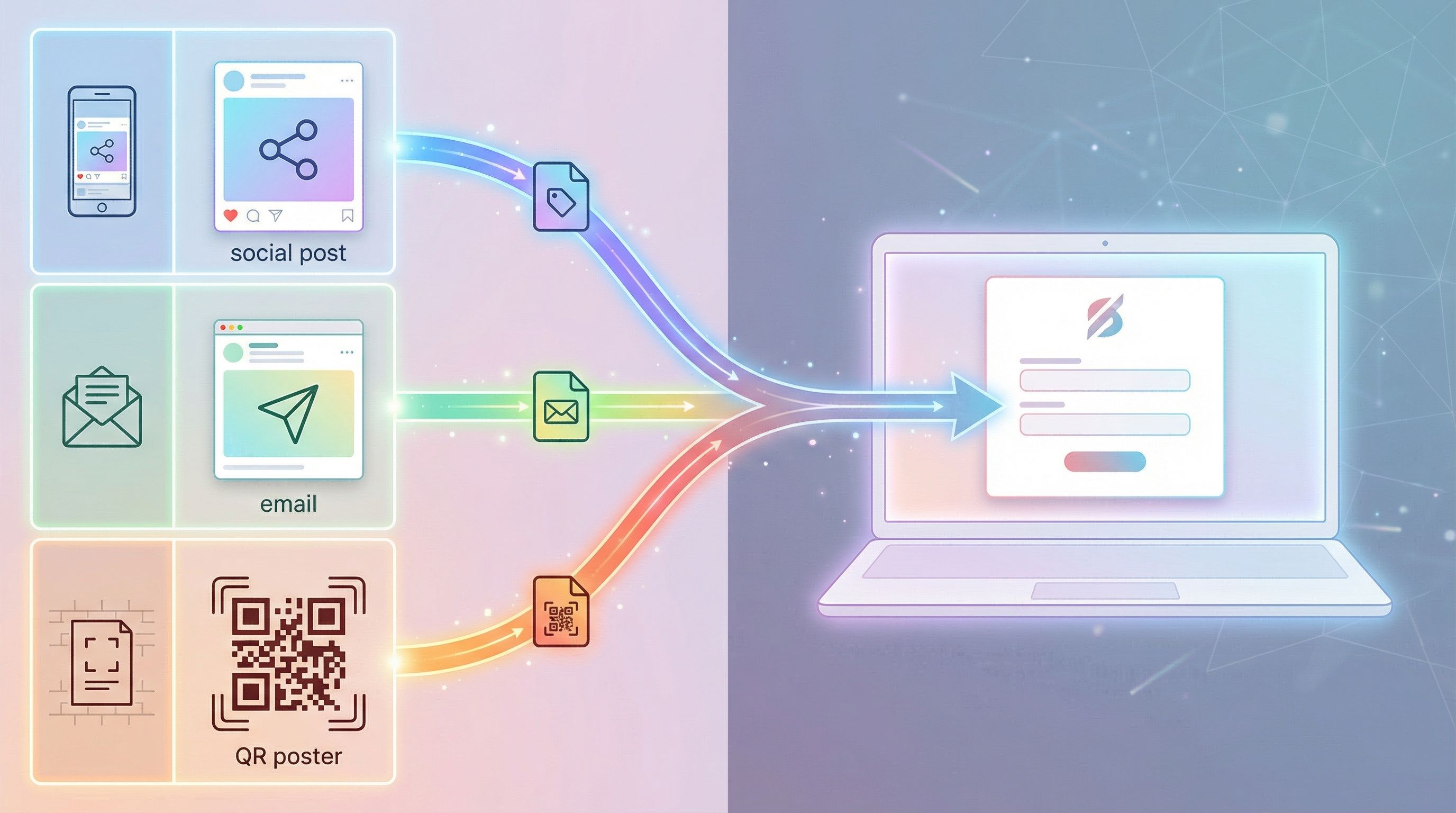
A URL-first campaign is any experiment where the primary variable lives in the link, not the page.
You’re not spinning up a new landing page every time you want to test:
- A new ad channel (LinkedIn vs. Facebook vs. newsletter swap)
- A different audience (US vs. EU, SMB vs. enterprise)
- A fresh angle or offer ("Free audit" vs. "ROI calculator" vs. "Strategy session")
Instead, you:
- Standardize the destination – usually a form with a strong, flexible layout.
- Customize the URL – using UTM parameters, short links, or branded paths.
- Route and segment based on the link – in your form tool, spreadsheet, and downstream systems.
With Ezpa.ge, that might look like:
- A single master form at
https://yourbrand.ezpa.ge/demo-request - Multiple campaign-specific URLs pointing to it:
https://yourbrand.ezpa.ge/demo-request?utm_source=linkedin&utm_campaign=brand-awareness-q1https://yourbrand.ezpa.ge/demo-request?utm_source=partner&utm_campaign=agency-referralshttps://yourbrand.ezpa.ge/demo-request?utm_source=email&utm_campaign=churn-winback
Behind the scenes, all of those submissions land in one Google Sheet, tagged by URL parameters. No new page needed.
Why URL-First Campaigns Matter
1. You Increase Experiment Volume Without Burning Out Design & Dev
Every time you require a net-new page, you:
- Add design work (layout, copy, responsive behavior)
- Add engineering work (implementation, QA, tracking)
- Add analytics work (events, dashboards, QA again)
That means fewer tests actually ship.
URL-first campaigns let you:
- Reuse proven form layouts and microcopy instead of rebuilding from scratch. If you’re already thinking in reusable chunks, this pairs naturally with concepts from Atomic Form Patterns: Reusable Layouts, Microcopy, and Logic You Can Drag-and-Drop Anywhere.
- Move from idea to test in a day by generating a new URL variant instead of a new page.
2. You Get Cleaner, More Centralized Data
When every test gets its own page, you end up with:
- Fragmented analytics
- Duplicated forms
- Multiple Sheets or CRM objects to reconcile later
With URL-first campaigns:
- One form = one schema – all responses share the same fields.
- URLs and parameters carry the context – source, campaign, audience, offer.
- Google Sheets becomes your live control center – especially if you’ve structured it intentionally, as in From Spreadsheet Chaos to Source of Truth: Structuring Google Sheets for Scalable Form Data.
3. You Can Test Offers Before You Invest in Full Experiences
You don’t need a full landing page to test whether people care about:
- A “Done-for-you setup” offer
- A “Free teardown” of their current stack
- A “Quarterly strategy review” with your team
You need:
- A compelling headline in your ad or email
- A clear, trustworthy form
- A spreadsheet to catch the signal
URL-first lets you validate which message–audience–channel combination gets people to raise their hand. You can build the fancy page later, once you know it’s worth the effort.
4. You Reduce Risk Around Security and Compliance
Every new page and form is another surface area to secure.
When you centralize on a small number of hardened, well-reviewed forms and use URLs to differentiate campaigns, you:
- Shrink your attack surface
- Keep sensitive data flowing through known, controlled patterns
- Reuse proven validation, consent, and logging setups
That’s especially valuable if you’re already thinking about guardrails like in Ops-Friendly Form Security: Practical Guardrails That Don’t Slow Teams Down.

The Core Building Blocks of a URL-First System
You don’t need a huge stack. You need a few pieces that play well together.
1. A Flexible, Branded Form as the “Front Door”
This form should be:
- On-brand and trustworthy – consistent theme, custom domain or subdomain, clear copy.
- Reusable – fields and logic that work across multiple campaigns.
- Configurable via URL parameters – able to read query params and adjust behavior, if needed (e.g., hidden fields, prefilled values).
With Ezpa.ge, you can:
- Use a custom URL like
https://campaigns.yourbrand.com/offer. - Maintain multiple themes for different brands or regions.
- Sync every submission in real time to Google Sheets for analysis and routing.
2. Clean, Intentional URL Schemas
Your URLs are now doing real work, so you can’t treat them as an afterthought.
At minimum, standardize:
- Source – where the click came from (
utm_source=linkedin,utm_source=podcast) - Medium – ad, email, QR, referral (
utm_medium=paid_social,utm_medium=email) - Campaign – the initiative (
utm_campaign=q2_pipeline_push) - Content or Offer – the specific angle (
utm_content=roi_calculator,utm_content=free_audit)
You can go further with custom parameters like:
audience=enterprisevs.audience=smbregion=navs.region=eupartner=acme-agency
The goal: every link tells a story that you can read later in your spreadsheet.
3. A Single Source-of-Truth Spreadsheet
This is where URL-first really shines.
Your Google Sheet should:
- Capture every form field as its own column
- Include raw URL and parsed parameters (either via Ezpa.ge’s mapping or simple formulas)
- Power filters, pivot tables, and dashboards by:
- Channel
- Audience
- Offer
- Region
Once that’s in place, you can layer on:
- Notifications to Slack or email when high-value leads arrive
- Routing rules (e.g., enterprise → AE team, SMB → self-serve nurture)
- Automations that trigger based on URL parameters (more on this later)
4. A Link Management Habit
You don’t strictly need a dedicated link tool, but it helps.
Options like Bitly, Rebrandly, or Short.io make it easier to:
- Keep URLs readable and on-brand
- Update destinations if your form changes
- See high-level click stats per link
Even without those, a simple “Link Registry” tab in your Google Sheet works well:
- One row per campaign link
- Columns for source, medium, audience, offer, owner, start date, and notes
Designing Your First URL-First Campaign
Let’s walk through a concrete example: you want to test three offers for your core product to see which drives the most qualified demo requests.
The offers:
- "Free pipeline audit"
- "ROI forecast report"
- "Personalized onboarding plan"
You’re running ads on LinkedIn and sending a targeted email to your existing list.
Step 1: Define the Core Form
You create a single Ezpa.ge form at:
https://campaigns.yourbrand.com/demo
Fields:
- Work email
- Company name
- Role / title
- Company size (dropdown)
- Primary goal (multi-select)
- Free-text context (optional)
Hidden fields (populated from URL parameters):
- Source
- Medium
- Campaign
- Offer
- Audience
Real-time sync: all responses go into Demo Requests – 2026 Google Sheet.
Step 2: Generate Your URLs
For LinkedIn ads:
-
Offer A (pipeline audit):
https://campaigns.yourbrand.com/demo?utm_source=linkedin&utm_medium=paid_social&utm_campaign=q1_offer_test&utm_content=pipeline_audit&offer=pipeline_audit&audience=prospect -
Offer B (ROI forecast):
https://campaigns.yourbrand.com/demo?utm_source=linkedin&utm_medium=paid_social&utm_campaign=q1_offer_test&utm_content=roi_forecast&offer=roi_forecast&audience=prospect -
Offer C (onboarding plan):
https://campaigns.yourbrand.com/demo?utm_source=linkedin&utm_medium=paid_social&utm_campaign=q1_offer_test&utm_content=onboarding_plan&offer=onboarding_plan&audience=prospect
For your email list:
- Offer A (pipeline audit):
https://campaigns.yourbrand.com/demo?utm_source=email&utm_medium=owned&utm_campaign=q1_offer_test&utm_content=pipeline_audit&offer=pipeline_audit&audience=customer
…and so on.
Step 3: Make the Form Feel Contextual (Optional but Powerful)
You can keep the form identical for everyone and just use URLs for attribution.
Or, you can let the URL lightly customize the experience:
- Prefill a field like "Primary goal" based on the offer
- Adjust the headline or subcopy if your form tool supports dynamic text based on parameters
- Show/hide specific questions for certain audiences (e.g., customers vs. net-new prospects)
The trick is to keep the form schema stable for clean data, while still giving people a sense that the page “matches” the promise in the ad or email.
Step 4: Track, Compare, and Decide
In your Google Sheet, create a pivot table or summary tab that shows, by offer and source:
- Number of submissions
- Qualified submissions (based on company size, role, or manual review)
- Downstream outcomes (e.g., booked calls, closed deals) if you’re syncing to a CRM
Suddenly, you’re not arguing about which offer “feels” best—you’re looking at:
- LinkedIn + Pipeline Audit → 45 submissions, 10 qualified, 3 deals
- LinkedIn + ROI Forecast → 30 submissions, 15 qualified, 5 deals
- Email + Onboarding Plan → 25 submissions, 18 qualified, 4 deals
The winning combination becomes obvious. You can invest in a dedicated landing page later, or simply scale the highest-performing URL.
Going Beyond Simple A/B Tests
Once your URL-first foundation is in place, you can get more creative.
1. Channel vs. Audience vs. Offer: Multidimensional Testing
Instead of just A/B testing two headlines, you can run matrix experiments across:
- Channels (LinkedIn, Google Ads, partner newsletters, events)
- Audiences (role, region, lifecycle stage)
- Offers (content, incentives, call-to-action)
Because:
- URLs encode the combination (e.g.,
source=partner,audience=enterprise,offer=roi_forecast). - Your form and sheet stay stable.
You’re effectively running many small experiments at once, without multiplying landing pages.
2. Using URLs to Drive Post-Submit Routing
URL parameters don’t have to stop at attribution.
You can also use them to:
- Route submissions to different internal owners (e.g.,
partner=acme→ partner manager inbox). - Trigger different follow-up sequences (e.g.,
audience=customer→ expansion playbook,audience=prospect→ new-logo nurture). - Segment submissions for ops workflows, especially if you’re using Ezpa.ge + Sheets automations like those described in From Form to Workflow: Automating Onboarding, Support, and QA with Ezpa.ge + Google Sheets.
In practice, that might look like:
- A Sheets formula that maps
offerto a “Playbook” column. - A no-code tool (Zapier, Make, or native Google Apps Script) that:
- Sends certain submissions to a dedicated Slack channel
- Creates tasks in Asana or Jira for specific campaigns
- Enrolls contacts in distinct email sequences
3. Micro-Experiments with Tiny Forms
URL-first thinking pairs beautifully with micro-forms and micro-surveys.
Instead of:
- Building a long feedback page for each feature or use case
You can:
- Use a single, well-designed micro-form
- Drive different user cohorts to it via tailored URLs
- Infer intent from both the URL and their answers
If you’re already experimenting with patterns from Tiny Forms, Big Revenue: Micro-Surveys and Single-Question Flows for Growth Teams, URL-first campaigns help you scale those tests without multiplying form variants.
4. Offline-to-Online Attribution With QR Codes
URL-first isn’t just for ads and email.
You can:
- Print QR codes on event signage, direct mail, or product packaging
- Encode parameters like
source=event,campaign=trade_show_2026,offer=swag_kit - Send everyone to the same underlying form
Now you can answer questions like:
- Which booth location drove more scans?
- Which physical insert ("Get a free audit" vs. "Unlock a discount") led to more high-intent submissions?
All without a single extra page.
Common Pitfalls (and How to Avoid Them)
Even simple systems can get messy if you don’t put a few guardrails in place.
1. Inconsistent Naming
If one teammate uses utm_source=linkedin and another uses utm_source=LinkedInAds, your reporting will be fragmented.
Fix it by:
- Defining a canonical list of values for source, medium, and campaign.
- Documenting them in your Link Registry or internal wiki.
- Having someone (RevOps, growth lead) spot-check new links.
2. Too Many Forms
The whole point of URL-first is to reuse forms, not create more.
Resist the urge to spin up a new form for every edge case. Instead:
- Keep one or two “master” forms per journey (e.g., demo, content download, feedback).
- Use URL parameters, conditional logic, and hidden fields to handle variation.
3. Ignoring Security and Consent
Just because you can launch forms quickly doesn’t mean you should skip:
- Clear consent language for data use
- Appropriate validation for sensitive fields
- Safe handling of PII or financial/health data
If your URL-first tests touch higher-risk information, borrow patterns from posts like Security Without Paranoia: Low-Friction Patterns for Collecting Sensitive Data in Forms to stay on the right side of trust.
4. No Feedback Loop to Strategy
It’s easy to run a dozen URL variants and then… forget to look at the results.
Prevent that by:
- Scheduling a recurring review (weekly or bi-weekly) for campaign performance.
- Making a simple habit: every experiment ends with a one-page recap—what we tried, what we learned, what we’ll double down on.
Putting It All Together: A Simple Starter Checklist
If you want to move into URL-first campaigns this quarter, here’s a practical starting point:
- Pick one core journey to focus on (demo request, waitlist, content download).
- Design or refine a single Ezpa.ge form for that journey with:
- Clean, on-brand layout
- Fields that work across multiple segments
- Hidden fields for URL parameters
- Set up a structured Google Sheet with:
- One tab for raw submissions
- One tab for parsed URL parameters and reporting
- Define your URL schema and naming rules for:
utm_source,utm_medium,utm_campaign,utm_content- Custom params like
offer,audience,region,partner
- Create 3–6 campaign URLs for your first test:
- At least two offers
- At least two channels or audiences
- Instrument a basic review loop:
- A simple pivot or dashboard
- A recurring calendar reminder to review performance
- Decide what “winning” means before you launch:
- Clicks? Submissions? Qualified leads? Revenue?
Once you’ve done this once, spinning up the next URL-first experiment is mostly copy–paste.
Summary
URL-first campaigns let you:
- Ship more experiments without waiting on new landing pages
- Centralize data in a single, well-structured form and spreadsheet
- Test channels, audiences, and offers in combinations—not just simple A/Bs
- Reduce security and maintenance overhead by reusing hardened, on-brand forms
By treating the URL as a first-class object—not just a copy/paste afterthought—you unlock a more agile, data-rich way to learn what actually moves your funnel.
Your Next Move
If you’re curious whether URL-first campaigns would actually change how your team works, don’t start with a grand re-architecture. Start with one journey.
- Pick a single form that matters—demo, waitlist, or key content.
- Turn it into a strong, reusable Ezpa.ge form with a clear custom URL.
- Create three distinct links pointing to it, each representing a different channel or offer.
- Wire those submissions into a live Google Sheet.
Then watch what happens for two weeks.
If you’re already using Ezpa.ge, you have most of the pieces in place: custom URLs, themes, and real-time Sheets syncing. The rest is a handful of parameters and a bit of discipline.
Take the first step: choose that one form, give it a URL you’re proud to share, and design your first URL-first experiment around it. The pages can come later. The learning starts as soon as someone clicks.